Control Network Newsletter

New Application Note: Configure the BASgatewaySX for Modbus Routing
BACnet is the most widely used protocol in the building automation industry today, while Modbus remains popular due to its simplicity and long-standing reliability. A new application note explains how to configure the BASgatewaySX to operate as a Modbus Serial to Modbus TCP router.
The BASgatewaySX (BASGSX-M1) provides gateway functionality between Modbus Serial (RTU or ASCII) and BACnet/IP and between Modbus TCP and BACnet/IP. This functionality is primarily used to integrate Modbus devices with a building management system (BMS). However, if communication between Modbus Serial and Modbus TCP devices is needed, the BASgatewaySX can simultaneously function as a Modbus Serial to Modbus TCP router.
In router mode, the device operates solely as a network layer router without any BACnet interaction. Therefore, configuration of the device object or point mapping is not required.
Modbus TCP devices can operate as clients, servers, or client/servers. When a Modbus TCP client needs to communicate with a Modbus RTU device, the client must treat the Modbus RTU device as if it were a Modbus TCP server. This means the device must be addressed using both a Modbus ID and an IP address.
The Modbus ID (slave address) will be the native Modbus ID of the Modbus RTU device connected to the BASGSX-M1, and the IP address will be that of the BASGSX-M1. This is the basis of Modbus RTU-to-Modbus TCP routing.
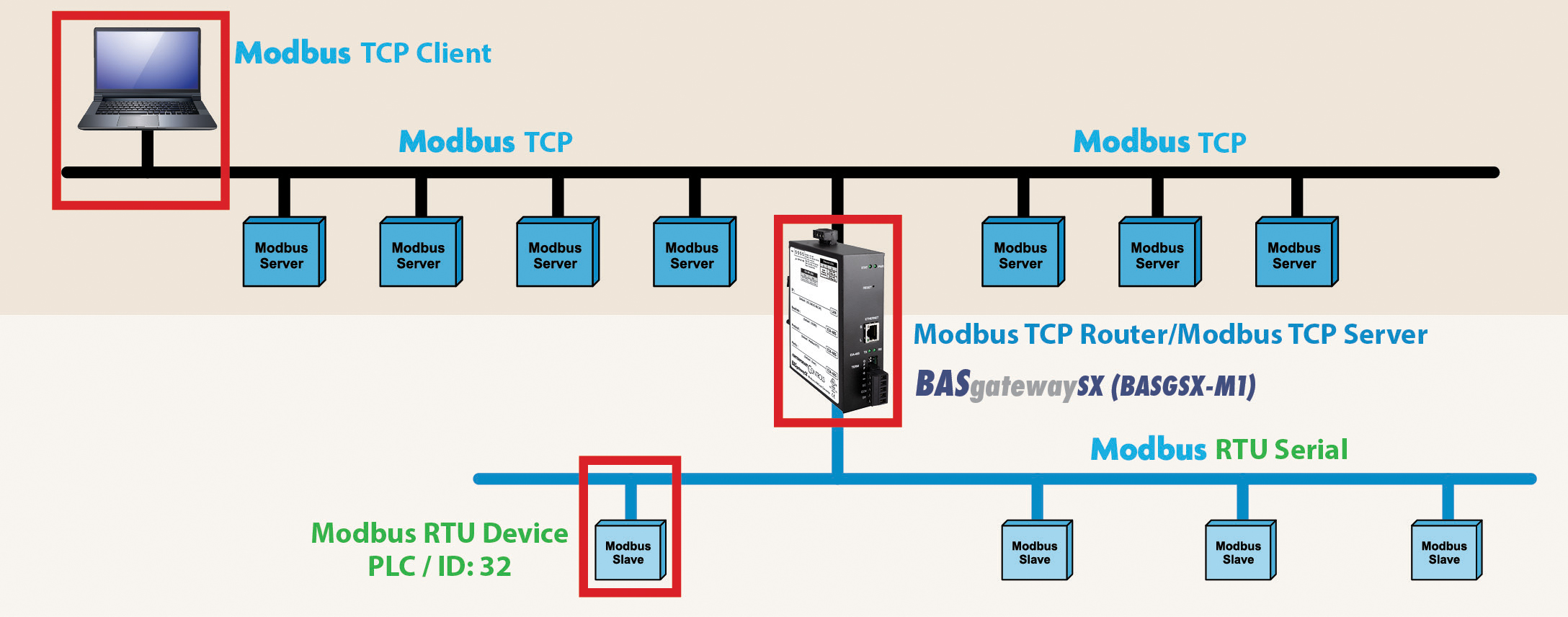
In this example, we connected:
- a PC (running the Modbus TCP client)
- the BASgatewaySX (Modbus TCP server)
- a Modbus RTU PLC (Modbus serial device)
Remember, the BASgatewaySX can route data from a Modbus serial device to a Modbus TCP client without mapping or special configuration, only the Modbus settings need to be configured as follows:
- The Modbus RTU parameters on the BASgatewaySX must match the parameters of the Modbus RTU PLC—specifically protocol, baud rate, and parity.
- The BASGSX-M1 IP settings must be within the same IP range and subnet as the Modbus TCP client. This ensures that the Modbus TCP client can communicate with the BASgatewaySX (acting as the Modbus TCP server) without connection issues.
For detailed instructions, read Application Note: Configure the BASgatewaySX for Modbus Routing or visit the BASgatewaySX product page.